[@Background Pony \#83CF](/images/3826792#comment_11511532)
oh yeah, my brother did mention it was probably the GPU, which doesn't surprise me considering i've already had issues with it. i'd rather wait until it breaks properly before messing with it, though.
Background Pony #83CF
[@Pelontrix](/images/3826792#comment_11511113)
691E here.
And honestly, that's a valid fear to have but that's not necessarily how it works. If your Windows 10 is blue screening, that means you either have a corrupted system file or driver, or you have failing hardware. It'd be scarier if it's failing hardware because then you gotta open your wallet and throw money at the problem.
If the problem is failing software, you can try either resetting Windows which is in your *Update & Secruity* settings; go to Recovery, then hit *Get Started* under Reset This PC. Backup the things you have though, so... get a flash drive big enough for everything.
If it still Blue Screens even after being factory reset, it's probs a hardware problem. You can try installing Linux Mint as a last ditch effort to see if it still is a Software problem, and if it fixes everything, congrats.
>>1931178t
Windows 10 and Linux Mint are both operating systems, so Linux does not run under any Windows 10 files, it's completely independent. And all of your files like your memes and text documents (usually .txt) will work flawlessly on Linux Mint.
The only caveat is if you use your PC to make your art; it'll be a little tricky if you're not using a Wacom and you're not comfortable with Krita. If you're not using a Wacom, you'll probs need to do just one extra step to get it work, but ChatGPT will help you with that, since I can't largely be arsed.
***Either way,*** do it or don't. I'm just giving you my honest thoughts and advice on what to do, and I promise you that if you ever install Linux Mint, it's not going to be hard. It's just:
*Flash Drive → balenaEtcher → download Linux Mint → use balenaEtcher to etch Linux Mint into Flash Drive → turn PC off → Turn PC on and Boot BIOS and make your USB bootable (easier than it sounds) → Save and turn PC off → plug in flash drive → install*
Refer to my original comment's YouTube links under the "***__Linux Mint install guides:__***" section, especially under the "Full Guide on how to install Linux Mint:" and trust the guidance SomeOrdinaryGamers has to offer, he'll walk you through it and ensure you have no issues.
Here are the websites as a shortcut:
https://etcher.balena.io/
https://linuxmint.com/
*Quick tip if you do finally reach that breaking point:* Downloading Linux is a little bit different from most software. Download the Cinnamon Edition, and select a server to download from in the list from the country you're in, and you'll have a Linux Mint egg, that you need Balena Etcher to hatch.
Pelontrix
[@Background Pony \#691E](/images/3826792#comment_11510819)
unfortunately for us all, i catastrophize, and considering this computer has bluescreened at least 6 times on win10, despite me being told it only really crashes with win11, i would prefer not to fuck my primary computer in the arse if some file shite goes wrong.
on the plus side, funny tutorial in comments for education porpoises.
Background Pony #691E
[@Pelontrix](/images/3826792#comment_11510692)
just install linux mint breh, [@Pelontrix](/images/3826792#comment_11510692)
ON the fr, yeah was kinda why I did it, I also thought it'd be funny.
Stay on Windows 10 if you want, but I'm just saying, installing Linux Mint really isn't that hard, just grab a USB flash drive and you're set.
Hope you use an ipad to draw though, cuz it works a little different in the streets of Linux
Background Pony #691E
[@Pelontrix](/images/3826792#comment_11510692)
Haha! You never expected someone to genuinely answer? **foolish**
Pelontrix
[@Background Pony \#691E](/images/3826792#comment_11510579)
i'm sorry but i'm laughing my ass off because an actual tutorial was not something i expected
i also actually need to get off my arse and install a linux distro of some sort because of win10 being out of security updates by now. the unfortunate thing is that i am a massive pussy.
getting people to install linux via derpibooru comments is sending me.
(one of these days i'll probably pay someone to install linux for me. today is not that day.)
Background Pony #691E
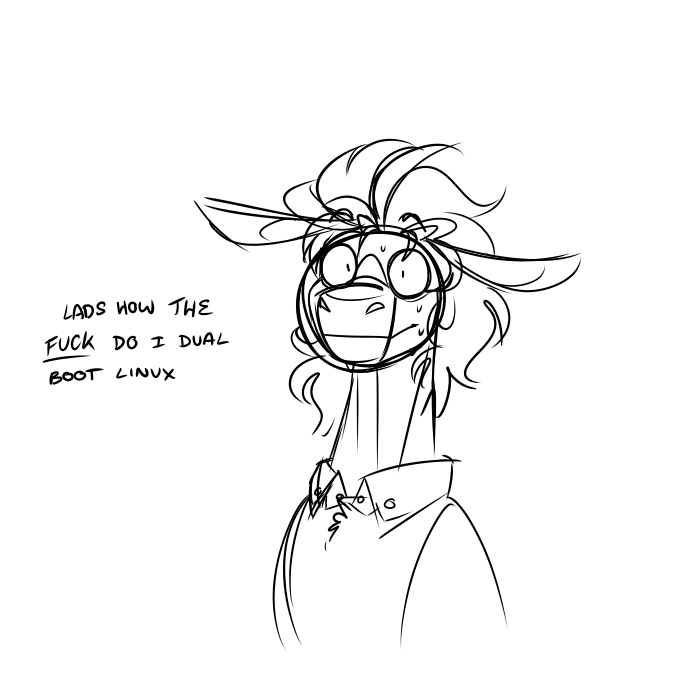
In case anyone looked at this image expecting an answer in the comments, TL;DR and video links at the bottom if you're aren't reading allat:
>>3571081t
__***PREREQUISATES:***__
You need 2 USB Flash Drives, one has to be 16GB for Windows, the other 4GB or 8GB for your Linux.
Use the Media Creation Tool to etch the 16GB flash drive into a Winows bootable drive, then use Balena Etcher (or Rufus) for your Linux flash drive.
Download a Linux distro of your choice, if you're new to Linux, choose Linux Mint. If you're experienced, choose Arch or some other Distro.
__***Windows 11:***__
Install Windows 11 first, use the method available to avoid creating a Microsoft account, do your usual Windows 11 routine of uninstalling all the unneeded apps, configuring it, then it's clean and ready.
Or use your existing Windows 11.
Next, open Control Panel, go to Hardware and Sound, next select Power Options. Now, select "Choose what the power button does," and once that's opened, click the "Change settings that are currently unavailable" then turn off "Turn on fast startup (recommended).
Now repartition free space by going to your Windows search and finding "Create and format disk partitions," right click on the "Healthy Primary Partition" that has the largest storage volume, "Shrink Volume" then give it the desired storage. If you're trying out Linux, give it 6000 MB (yes, it's in megabytes). If you plan on using Linux as your main system but keeping Windows because you're a creative (art, editing, microsoft office) then give it much more storage for gaming and casual use.
__***For Linux Mint:***__
>>3819623s
After that, turn off your computer, boot into BIOS, and set the Boot Order to prioritize booting from USB, then plug your Linux Flash Drive in, and turn it off then on.
You should automatically boot into a Linux Mint environment to test it out, then click on the Disk icon on the desktop that says "Install Linux Mint" and go through the steps, select "Install Linux Mint alongside Windows Boot Manager" and you're off to the races.
Continue the rest of the installation and boom: Linux.
__***For Arch Linux Masochists:***__
>>1165145s
If you're installing Arch, turn off Secure Boot and maybe TPM then boot into your Arch installation. Run the "archinstall" script.
If you're doing it manually:
Use "lsblk" a lot, it'll be your best friend for this, and let's assume your partition will be listed as "nvme0n1" but you'll also have "sda," so for ambiguity, I'll be using "sdx" so when you see "sdx" assume it means your storage name.
Use "cfdisk" and avoid making partitions using the Windows stuff. Make a separate "EFI Partition" because that's where GRUB is going to go.
Now instead of "mount -m /dev/sdx5 /mnt/boot", you're gonna do this instead: "mount -m /dev/sdx5 /mnt/boot/efi" add the extre /efi part in there.
Now ensure you hit these packages at the end of your install hit the chroot with the
"pacman -S grub efibootmgr os-prober mtools dosfstools ntfs-3g fuse3"
Also make sure you have "vim" installed, if you don't, type: "pacman -S vim"
Now then, type: "vim /etc/defaut/grub" and find:
#GRUB_DISABLE_OS_PROBER=FALSE
And delete the "#," then hit your Esc key, and type ":wq"
Now run this, and use two dashes instead of one before typing the orders, it's Derpibooru's syntax thing making it look like one dash:
"grub-install ---target=x86_64-efi ---efi-directory=/boot/efi ---bootloader-id="GRUB" ---modules="tpm" ---disable-shim-lock"
Then hit Enter, it should install with no problems. If it does? Read the error, it should tell you how to fix it.
Now once you're booted into Arch, run your favorite Window Manger or Desktop Environment and then install "sbctl" so you can add Arch Linux to your Secure Boot, but don't expect it to do all the work, you're using Arch remember? You gotta run it yourself.
***__YouTube Tutorials:__***
__***Windows 11 Guides:***__
Here for those of you who want to skip reading now but might refer to this later:
Turning off fastboot:
https://youtu.be/L049J2yxY_w
Partitioning Storage: **LEAVE THE PARTITION BLACK "(unallocated)"** that's where your Linux is going
https://youtu.be/5jvpSv-WSc0
__***Linux Mint install guides:***__
Dual boot speed guide (just watch like the installation part, it's only 1 minute or so):
https://youtu.be/KWVte9WGxGE?t=184
Full Guide on how to install Linux Mint:
https://youtu.be/IyT4wfz5ZMg (Yes, Mutahar, I think he's the best teacher for what to do).
__***Arch Linux install guides:***__ Quick warning, you'll be combining what you learn from these videos, as is the way of Arch Linux:
Manual Installation of Vanilla Arch Linux (watch for basics):
https://youtu.be/oeDbo-HRaZo
Manually installing Arch Linux with Windows boot:
https://youtu.be/LGhifbn6088
ArchInstall Script:
https://youtu.be/9DO0MI2VtsE
__***Using sbctl:***__
"Install Secure Boot on Arch Linux (the easy way)"
https://youtu.be/yU-SE7QX6WQ
"T.T.D.D. Arch Linux | P3 - Setup secure-boot"
https://youtu.be/JOZFNP6U8Q4
__***Ending Notes:***__
>>2566031t
Just use Linux Mint brah, use Arch when you're ready. I will admit, I personally think Arch is just better than Linux Mint in every way, but at the same time, I'm only saying that because *I'm* built for using multiple Linux Distros.
Use what makes you happy; if you're happy with Linux Mint for years, decades even, then I'm glad to have a new shiny member for the Linux community.
Do not let my elitism, and others' elitism get you down. Anyone who says you should use the harder distros just because "it's the Linux way" is unloved.
But remember, if you ever feel ready to do it, you can try Arch Linux via KVM/QEMU. It was what got me started.
Comments
No comments yet.
Log in to comment.
derpibooru.org · 3826792
[@Background Pony \#83CF](/images/3826792#comment_11511532) oh yeah, my brother did mention it was probably the GPU, which doesn't surprise me considering i've already had issues with it. i'd rather wait until it breaks properly before messing with it, though.
[@Pelontrix](/images/3826792#comment_11511113) 691E here. And honestly, that's a valid fear to have but that's not necessarily how it works. If your Windows 10 is blue screening, that means you either have a corrupted system file or driver, or you have failing hardware. It'd be scarier if it's failing hardware because then you gotta open your wallet and throw money at the problem. If the problem is failing software, you can try either resetting Windows which is in your *Update & Secruity* settings; go to Recovery, then hit *Get Started* under Reset This PC. Backup the things you have though, so... get a flash drive big enough for everything. If it still Blue Screens even after being factory reset, it's probs a hardware problem. You can try installing Linux Mint as a last ditch effort to see if it still is a Software problem, and if it fixes everything, congrats. >>1931178t Windows 10 and Linux Mint are both operating systems, so Linux does not run under any Windows 10 files, it's completely independent. And all of your files like your memes and text documents (usually .txt) will work flawlessly on Linux Mint. The only caveat is if you use your PC to make your art; it'll be a little tricky if you're not using a Wacom and you're not comfortable with Krita. If you're not using a Wacom, you'll probs need to do just one extra step to get it work, but ChatGPT will help you with that, since I can't largely be arsed. ***Either way,*** do it or don't. I'm just giving you my honest thoughts and advice on what to do, and I promise you that if you ever install Linux Mint, it's not going to be hard. It's just: *Flash Drive → balenaEtcher → download Linux Mint → use balenaEtcher to etch Linux Mint into Flash Drive → turn PC off → Turn PC on and Boot BIOS and make your USB bootable (easier than it sounds) → Save and turn PC off → plug in flash drive → install* Refer to my original comment's YouTube links under the "***__Linux Mint install guides:__***" section, especially under the "Full Guide on how to install Linux Mint:" and trust the guidance SomeOrdinaryGamers has to offer, he'll walk you through it and ensure you have no issues. Here are the websites as a shortcut: https://etcher.balena.io/ https://linuxmint.com/ *Quick tip if you do finally reach that breaking point:* Downloading Linux is a little bit different from most software. Download the Cinnamon Edition, and select a server to download from in the list from the country you're in, and you'll have a Linux Mint egg, that you need Balena Etcher to hatch.
[@Background Pony \#691E](/images/3826792#comment_11510819) unfortunately for us all, i catastrophize, and considering this computer has bluescreened at least 6 times on win10, despite me being told it only really crashes with win11, i would prefer not to fuck my primary computer in the arse if some file shite goes wrong. on the plus side, funny tutorial in comments for education porpoises.
[@Pelontrix](/images/3826792#comment_11510692) just install linux mint breh, [@Pelontrix](/images/3826792#comment_11510692) ON the fr, yeah was kinda why I did it, I also thought it'd be funny. Stay on Windows 10 if you want, but I'm just saying, installing Linux Mint really isn't that hard, just grab a USB flash drive and you're set. Hope you use an ipad to draw though, cuz it works a little different in the streets of Linux
[@Pelontrix](/images/3826792#comment_11510692) Haha! You never expected someone to genuinely answer? **foolish**
[@Background Pony \#691E](/images/3826792#comment_11510579) i'm sorry but i'm laughing my ass off because an actual tutorial was not something i expected i also actually need to get off my arse and install a linux distro of some sort because of win10 being out of security updates by now. the unfortunate thing is that i am a massive pussy. getting people to install linux via derpibooru comments is sending me. (one of these days i'll probably pay someone to install linux for me. today is not that day.)
In case anyone looked at this image expecting an answer in the comments, TL;DR and video links at the bottom if you're aren't reading allat: >>3571081t __***PREREQUISATES:***__ You need 2 USB Flash Drives, one has to be 16GB for Windows, the other 4GB or 8GB for your Linux. Use the Media Creation Tool to etch the 16GB flash drive into a Winows bootable drive, then use Balena Etcher (or Rufus) for your Linux flash drive. Download a Linux distro of your choice, if you're new to Linux, choose Linux Mint. If you're experienced, choose Arch or some other Distro. __***Windows 11:***__ Install Windows 11 first, use the method available to avoid creating a Microsoft account, do your usual Windows 11 routine of uninstalling all the unneeded apps, configuring it, then it's clean and ready. Or use your existing Windows 11. Next, open Control Panel, go to Hardware and Sound, next select Power Options. Now, select "Choose what the power button does," and once that's opened, click the "Change settings that are currently unavailable" then turn off "Turn on fast startup (recommended). Now repartition free space by going to your Windows search and finding "Create and format disk partitions," right click on the "Healthy Primary Partition" that has the largest storage volume, "Shrink Volume" then give it the desired storage. If you're trying out Linux, give it 6000 MB (yes, it's in megabytes). If you plan on using Linux as your main system but keeping Windows because you're a creative (art, editing, microsoft office) then give it much more storage for gaming and casual use. __***For Linux Mint:***__ >>3819623s After that, turn off your computer, boot into BIOS, and set the Boot Order to prioritize booting from USB, then plug your Linux Flash Drive in, and turn it off then on. You should automatically boot into a Linux Mint environment to test it out, then click on the Disk icon on the desktop that says "Install Linux Mint" and go through the steps, select "Install Linux Mint alongside Windows Boot Manager" and you're off to the races. Continue the rest of the installation and boom: Linux. __***For Arch Linux Masochists:***__ >>1165145s If you're installing Arch, turn off Secure Boot and maybe TPM then boot into your Arch installation. Run the "archinstall" script. If you're doing it manually: Use "lsblk" a lot, it'll be your best friend for this, and let's assume your partition will be listed as "nvme0n1" but you'll also have "sda," so for ambiguity, I'll be using "sdx" so when you see "sdx" assume it means your storage name. Use "cfdisk" and avoid making partitions using the Windows stuff. Make a separate "EFI Partition" because that's where GRUB is going to go. Now instead of "mount -m /dev/sdx5 /mnt/boot", you're gonna do this instead: "mount -m /dev/sdx5 /mnt/boot/efi" add the extre /efi part in there. Now ensure you hit these packages at the end of your install hit the chroot with the "pacman -S grub efibootmgr os-prober mtools dosfstools ntfs-3g fuse3" Also make sure you have "vim" installed, if you don't, type: "pacman -S vim" Now then, type: "vim /etc/defaut/grub" and find: #GRUB_DISABLE_OS_PROBER=FALSE And delete the "#," then hit your Esc key, and type ":wq" Now run this, and use two dashes instead of one before typing the orders, it's Derpibooru's syntax thing making it look like one dash: "grub-install ---target=x86_64-efi ---efi-directory=/boot/efi ---bootloader-id="GRUB" ---modules="tpm" ---disable-shim-lock" Then hit Enter, it should install with no problems. If it does? Read the error, it should tell you how to fix it. Now once you're booted into Arch, run your favorite Window Manger or Desktop Environment and then install "sbctl" so you can add Arch Linux to your Secure Boot, but don't expect it to do all the work, you're using Arch remember? You gotta run it yourself. ***__YouTube Tutorials:__*** __***Windows 11 Guides:***__ Here for those of you who want to skip reading now but might refer to this later: Turning off fastboot: https://youtu.be/L049J2yxY_w Partitioning Storage: **LEAVE THE PARTITION BLACK "(unallocated)"** that's where your Linux is going https://youtu.be/5jvpSv-WSc0 __***Linux Mint install guides:***__ Dual boot speed guide (just watch like the installation part, it's only 1 minute or so): https://youtu.be/KWVte9WGxGE?t=184 Full Guide on how to install Linux Mint: https://youtu.be/IyT4wfz5ZMg (Yes, Mutahar, I think he's the best teacher for what to do). __***Arch Linux install guides:***__ Quick warning, you'll be combining what you learn from these videos, as is the way of Arch Linux: Manual Installation of Vanilla Arch Linux (watch for basics): https://youtu.be/oeDbo-HRaZo Manually installing Arch Linux with Windows boot: https://youtu.be/LGhifbn6088 ArchInstall Script: https://youtu.be/9DO0MI2VtsE __***Using sbctl:***__ "Install Secure Boot on Arch Linux (the easy way)" https://youtu.be/yU-SE7QX6WQ "T.T.D.D. Arch Linux | P3 - Setup secure-boot" https://youtu.be/JOZFNP6U8Q4 __***Ending Notes:***__ >>2566031t Just use Linux Mint brah, use Arch when you're ready. I will admit, I personally think Arch is just better than Linux Mint in every way, but at the same time, I'm only saying that because *I'm* built for using multiple Linux Distros. Use what makes you happy; if you're happy with Linux Mint for years, decades even, then I'm glad to have a new shiny member for the Linux community. Do not let my elitism, and others' elitism get you down. Anyone who says you should use the harder distros just because "it's the Linux way" is unloved. But remember, if you ever feel ready to do it, you can try Arch Linux via KVM/QEMU. It was what got me started.